Collecting information is easy for me. I have notes, ideas, articles, tasks and things I want to learn. The hard part is bringing that knowledge back at the right moment — and doing something with it.
That is why I am building Vault Companion: a personal app that connects my notes to everyday life. It brings together tasks and activities, displays findings from my AI scouts, and makes effort visible through levels, professions and achievements.
A personal project · A working AI system
AI finds possibilities. I choose. The app keeps track of the actions.
This is a tour of both the experience and the engineering behind it. You do not need access to the app or a background in AI to follow along.
The screenshots show the real app in an isolated demo environment with fictional tasks, findings and activity records. Dates, scores and levels are examples, not my personal results. This article does not provide access to the private app or my notes.
1. Scouts: from searching to a shortlist
A scout is my name for a recurring job with a specific purpose: finding relevant events, learning opportunities or research, for example. It works in the background and leaves results for me to read later.
Instead of repeating the same search, I can open the app and see what was found. The overview also shows whether the job actually succeeded.
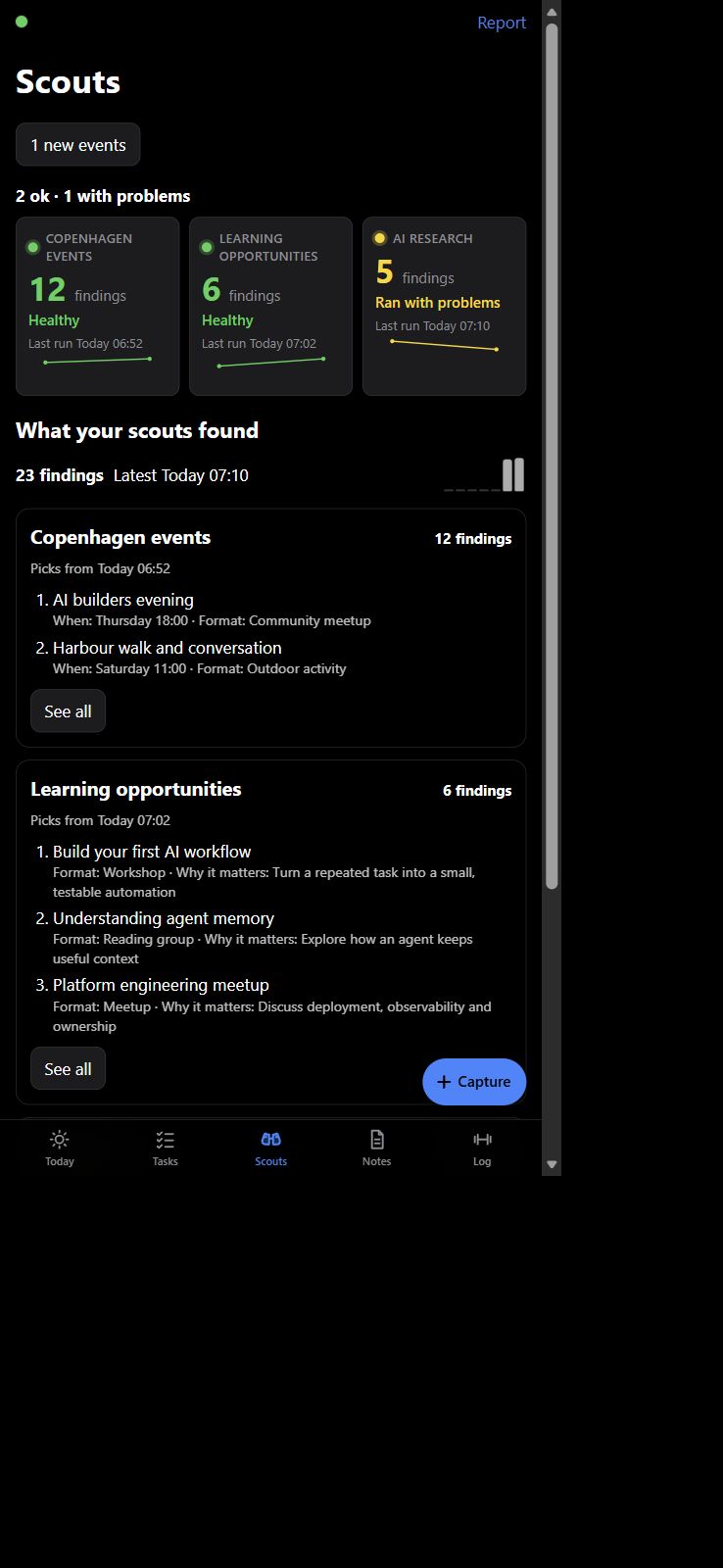
That distinction matters. When no new findings appear, I need to tell “nothing relevant was found” apart from “a source could not be reached.” An attractive AI summary cannot answer that question by itself.
AI is useful for assessing relevance and producing a short summary. The surrounding code manages execution, structure and status. The model should not be responsible for deciding whether its own run technically succeeded.
2. From an AI finding to my decision
A finding becomes useful when I can act on it. An event card shows the time, location, reasoning and calendar context. I can choose Skip, Maybe or Go.
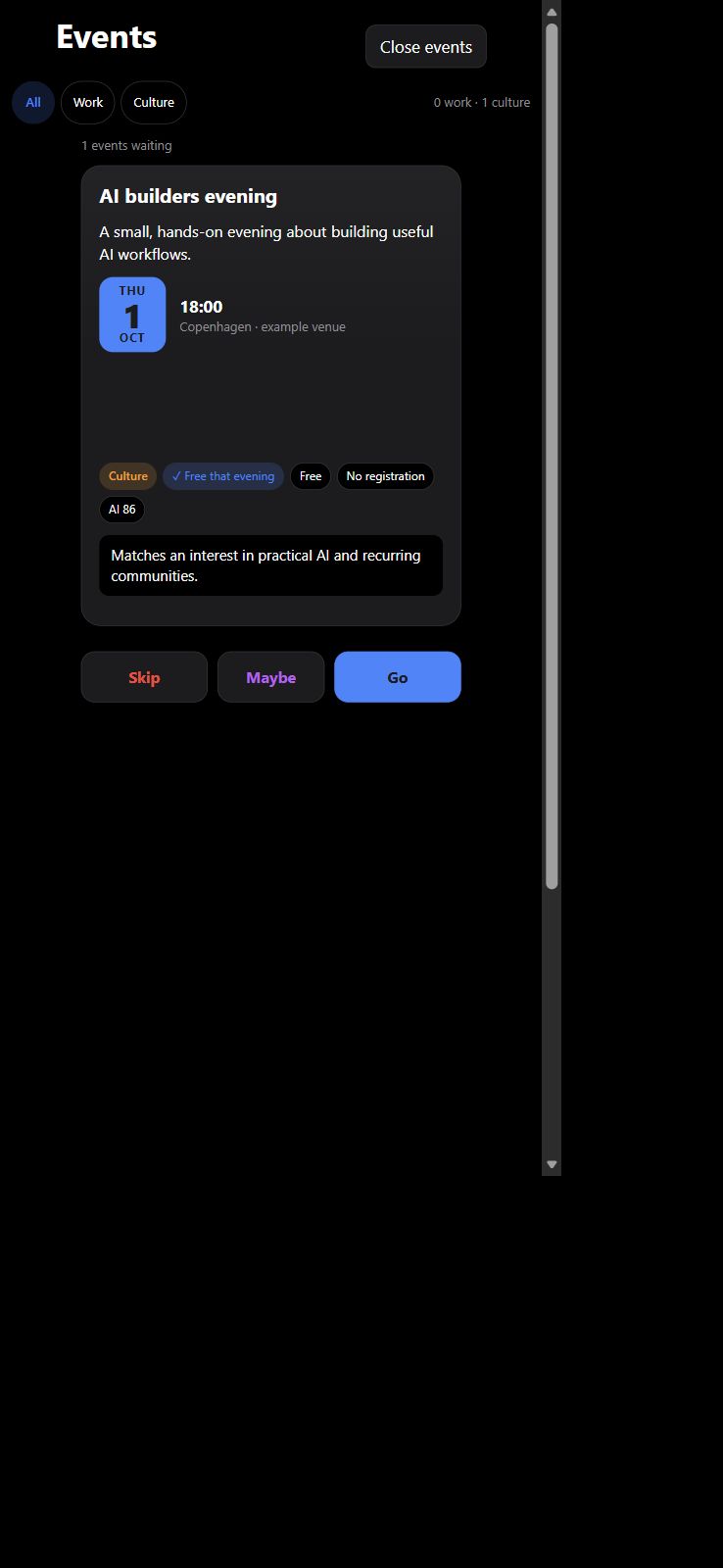
Imagine a scout finds an evening about practical AI. It explains why the event might be relevant. I decide whether that is how I want to spend Thursday.
When I choose Go, the app records my decision. In the connected workflow, a job on my computer can process it and update the calendar. These are separate steps and may not happen immediately. Pressing a button and completing an update in another system are different states.
This is also a useful way to understand AI agents: they receive a task, access to particular tools and somewhere to deliver a result. How far they can act independently is a design decision.
3. Gamification: making effort visible
I also wanted to see the effort that easily disappears into a list of completed tasks. The app has a character sheet with XP, levels, professions and achievements.
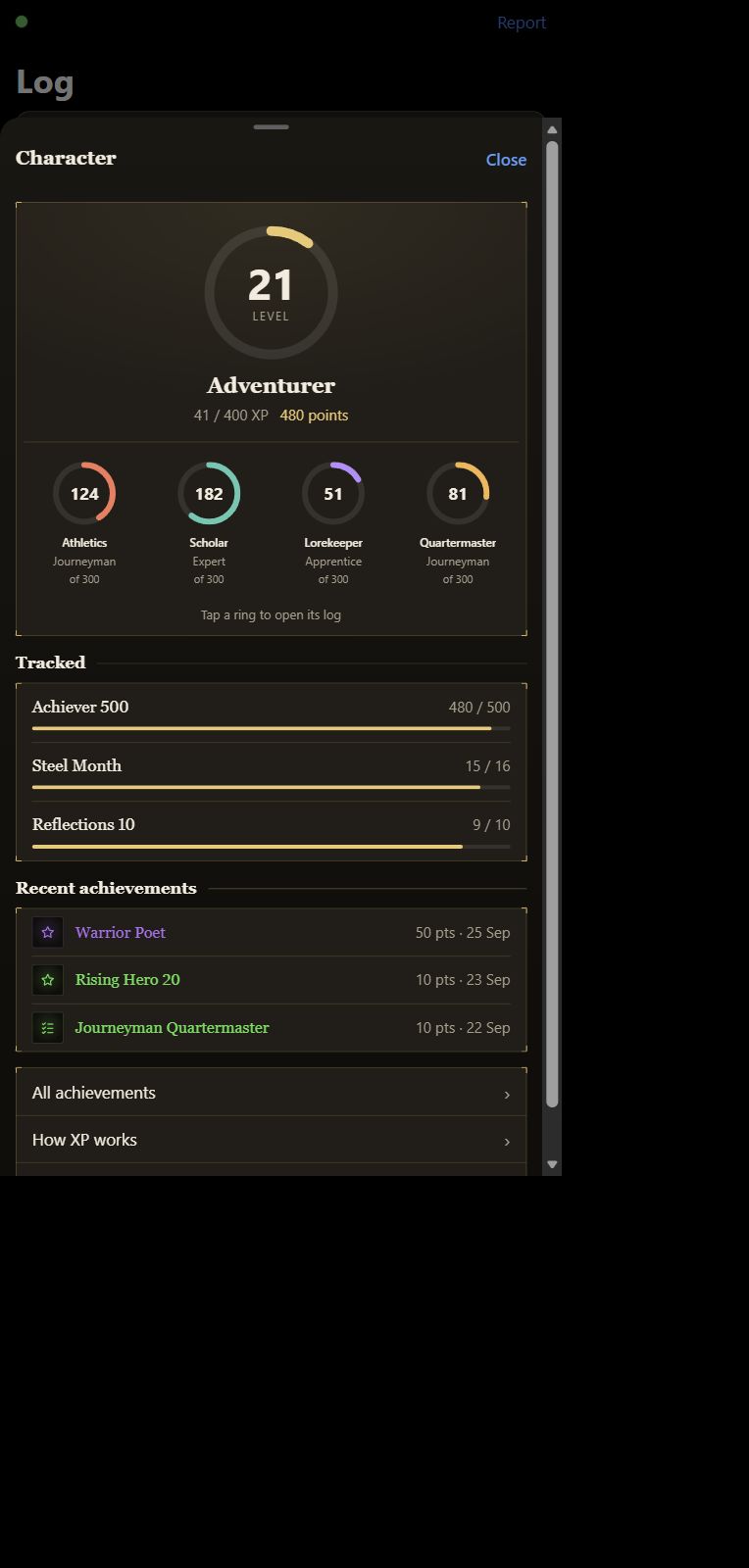
The four professions are Athletics, Scholar, Lorekeeper and Quartermaster. Training, learning, reflection and tasks have their own expression within the same system.
XP follows fixed rules with daily caps. No AI invents the rewards, and earned XP does not disappear when I take a break. Training rewards participation; the points do not measure physical improvement. Scholar XP is not proof that I have mastered a subject either.
The game is a way to display activity. Whether it helps me sustain useful habits is something to assess through use. A polished dashboard does not establish that on its own.
4. Under the hood: my notes are the foundation
The word vault comes from my Obsidian vault: a folder of notes written in Markdown, a simple text format. The app gives me another way into those kinds of information, especially from my phone.
Here is the overall architecture:
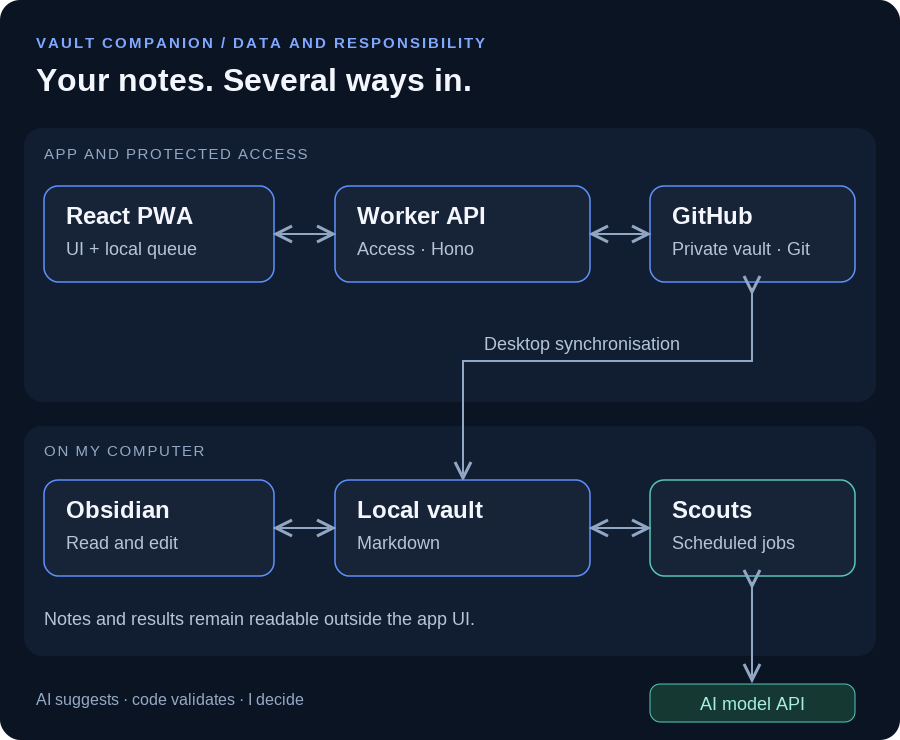
The frontend is a React app built with Vite and can run as a PWA: a web app that can also be installed on a phone. The API uses Hono on a Cloudflare Worker, protected by Cloudflare Access. Git versions the notes, while synchronisation connects GitHub to my local vault.
That choice has a cost. Text files are readable and fit my existing workflow, but they are not a database with transactions included. When both the phone and the computer can edit content, the system has to handle concurrent changes and old versions.
The app therefore uses bounded commands and revision checks. It attempts to change the relevant piece of text and can refuse a change when the content no longer matches what it read. I prefer an explainable refusal to a silent overwrite.
5. Fast feedback still has to be truthful
An app feels slow if every checkbox waits for the network. But immediate feedback must not imply that something has been saved when it has not.
Vault Companion has a local queue in IndexedDB, the browser’s local storage. Actions have their own identifiers so repeated submissions can be recognised. The client and server share game rules: the client can predict a reward, and the server response later confirms or corrects it.
| Situation | What the system must distinguish |
|---|---|
| I record an activity | The action exists locally; it may not yet be saved in the vault. |
| The phone has no connection | The action waits in the queue on this device. |
| The server accepts the change | The saved state can be confirmed and expected XP reconciled. |
| A change is refused | The app must show the problem and correct the provisional reward. |
This is ordinary software engineering, but it is a substantial part of making an AI system useful. A good model suggestion does little for me if the action afterwards disappears or is recorded twice.
What the project has taught me about AI
I use AI both during development and in workflows around the app. Those roles need to be distinguished: code written with AI does not necessarily call a language model when it runs.
| AI | Ordinary code | Me |
|---|---|---|
| Assess relevance and summarise findings | Validate data, manage synchronisation and calculate XP | Set goals, evaluate suggestions and make decisions |
This project serves one user. I am not presenting it as a finished product for everyone or as evidence of measured productivity gains. There are still bugs to find and friction to remove. Scout quality, synchronisation and whether the rewards help in practice all require ongoing work.
If you want to build something with AI, start with one recurring task. Decide what the output should be, where it will be stored, how failures become visible, and when a person should take over. Those boundaries matter at least as much as the choice of model.
Technical basis
This description is grounded in Vault Companion’s source code and documentation, including domain logic, contracts, test fixtures and architecture decisions. The screenshots use the existing application UI with isolated test data. The diagram simplifies the system; scout producers belong to the surrounding desktop workflow.